DoLadu

Offline QA for 3D projects · Windows

Your FBX has
flipped normals.
Your viewport says it's fine.

Unreal disagrees. Usually the night before handoff.

DoLadu scans the whole project in one pass and scores it out of 100 — then fixes what it found. It runs on your machine, with the network cable out.

No account, no cloud, no telemetry Windows · one file Runs on your machine, not in a cloud
SCROLL

The expensive part

The problem was never
the modelling.

It's the fifty small things between “done” and “delivered”. A normal map in the wrong colour space. Two textures at 4K that should be 1K. A pivot that isn't at the origin. Naming that passes your eye and fails the importer.

None of them are hard to fix. All of them are hard to find — and you find them at the worst possible moment, in someone else's engine, with your name on the file.

Project Audit · Hero_Character
0 / 100 Minor issues
Naming conventionMatches UE profile
NormalsWinding uniform
UVs · texel densityWithin target
Pivot at originOffset 4.2 cm
Texture sizes2 at 4K, should be 1K
Colour spaceT_Skin_N · sRGB, expected Linear
Duplicates · scaleClean · centimetres
Every finding names the file and offers the fix as a button

One pass

One scan.
One number.
Then the list.

Point it at a project folder. It reads every mesh and every texture once, then scores the project out of 100 across naming, normals, UVs, texel density, texture sizes and colour space, duplicates, pivots, scale, collision meshes and lightmap UVs.

The score is the headline. The list under it is the work — every finding names the file, says what's wrong, and offers the fix as a button.

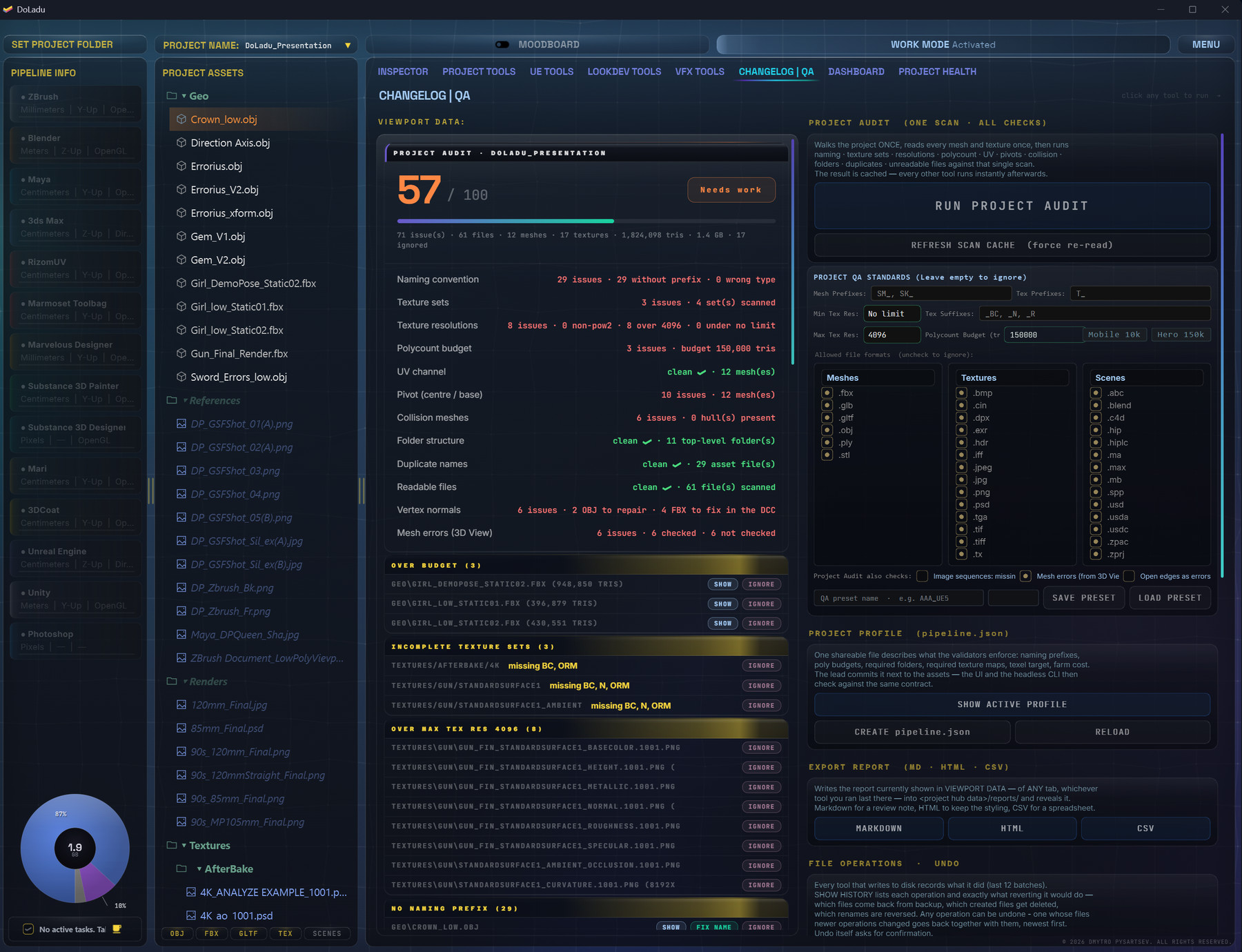
DoLadu Project Audit: a score out of 100 and issues grouped by area — naming, texture sets, resolutions, poly budget, pivots
Screenshot slotdoladu/assets/shots/audit-01.jpg
Project Audit — a score out of 100, and every issue grouped by area.
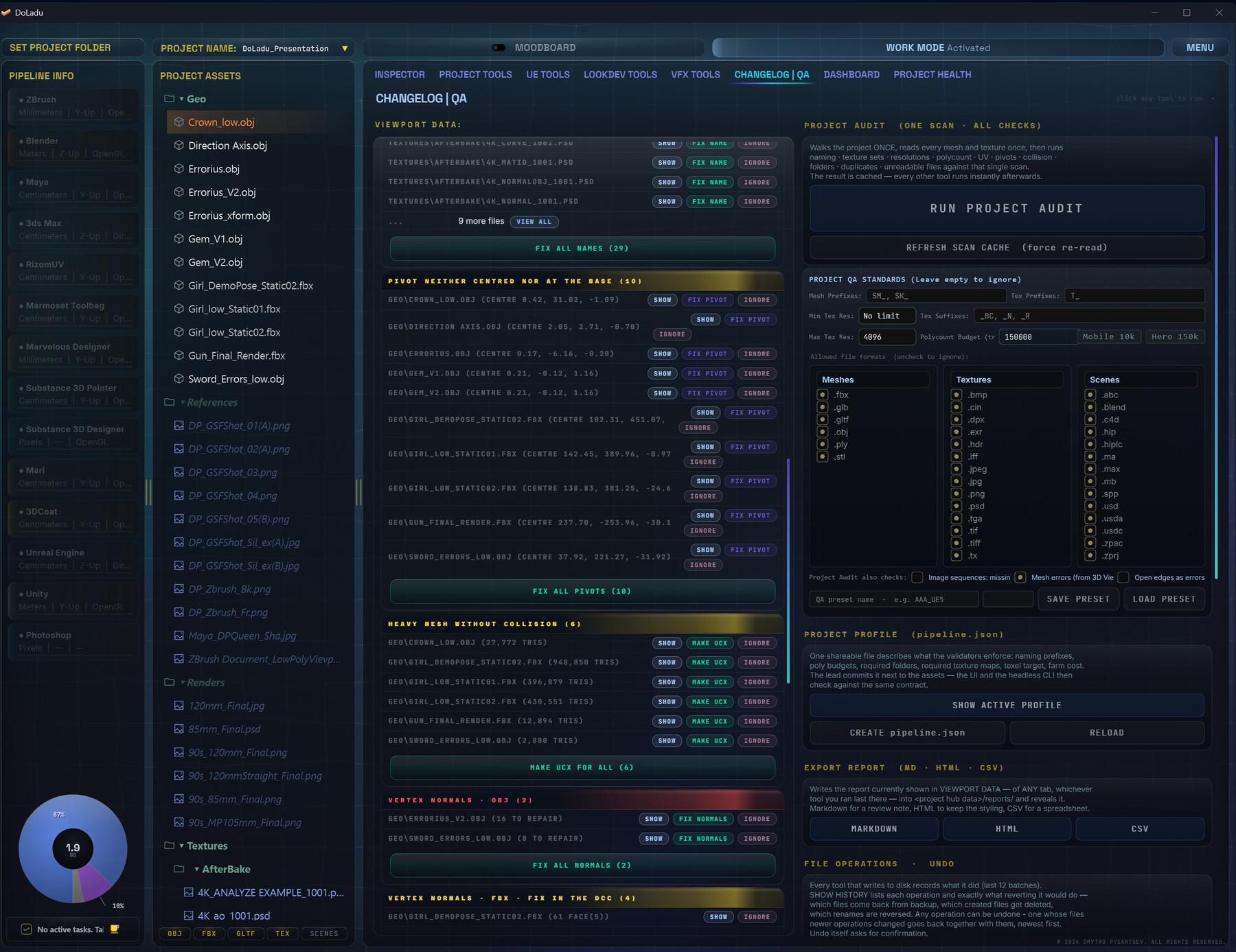
DoLadu Project Audit: pivot, collision and normal problems listed by file, each with a fix button and a Fix all button per group
Screenshot slotdoladu/assets/shots/audit-02.jpg
Project Audit — every finding names its file, with a fix beside it and a Fix all per group.

The difference

It fixes what it found.

Repack ORM. Convert rough ↔ gloss. Resize to power-of-two. Rename to the UE convention. Move pivots to origin. Flip a normal map's green channel. Batch-convert formats.

Every destructive step is journalled. One command puts it all back — including the batch you ran twenty minutes ago.

Safe mode is on by default: results go to copies, your originals are never touched until you say so.

Measured · 2 meshes / 19 textures
First scan 2.86 s
Every tool after 0.06 s
Re-read 0.001 s

Measured on a real character, not estimated.

Speed

Fast because
it reads once.

The first scan is cached. Every other tool reads from that cache instead of touching the disk again.

That's the difference between a tool that stalls the app every time you click something, and one that answers instantly.

The workspace

Built like a workspace,
not a wizard.

Nine workspaces, one project. Each one opens on what it's for and remembers where you left it.

Inspector

The things a viewport
won't show you.

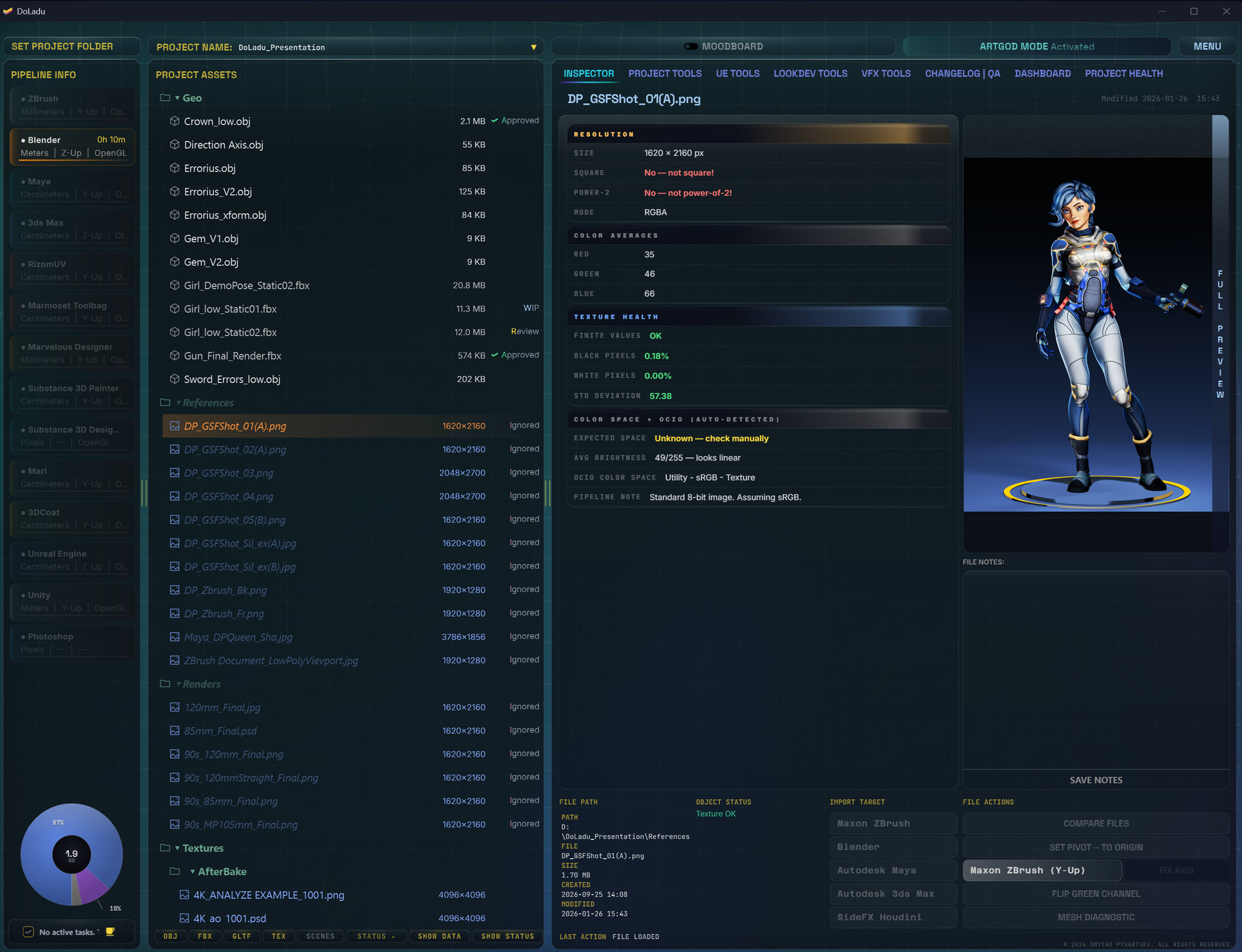
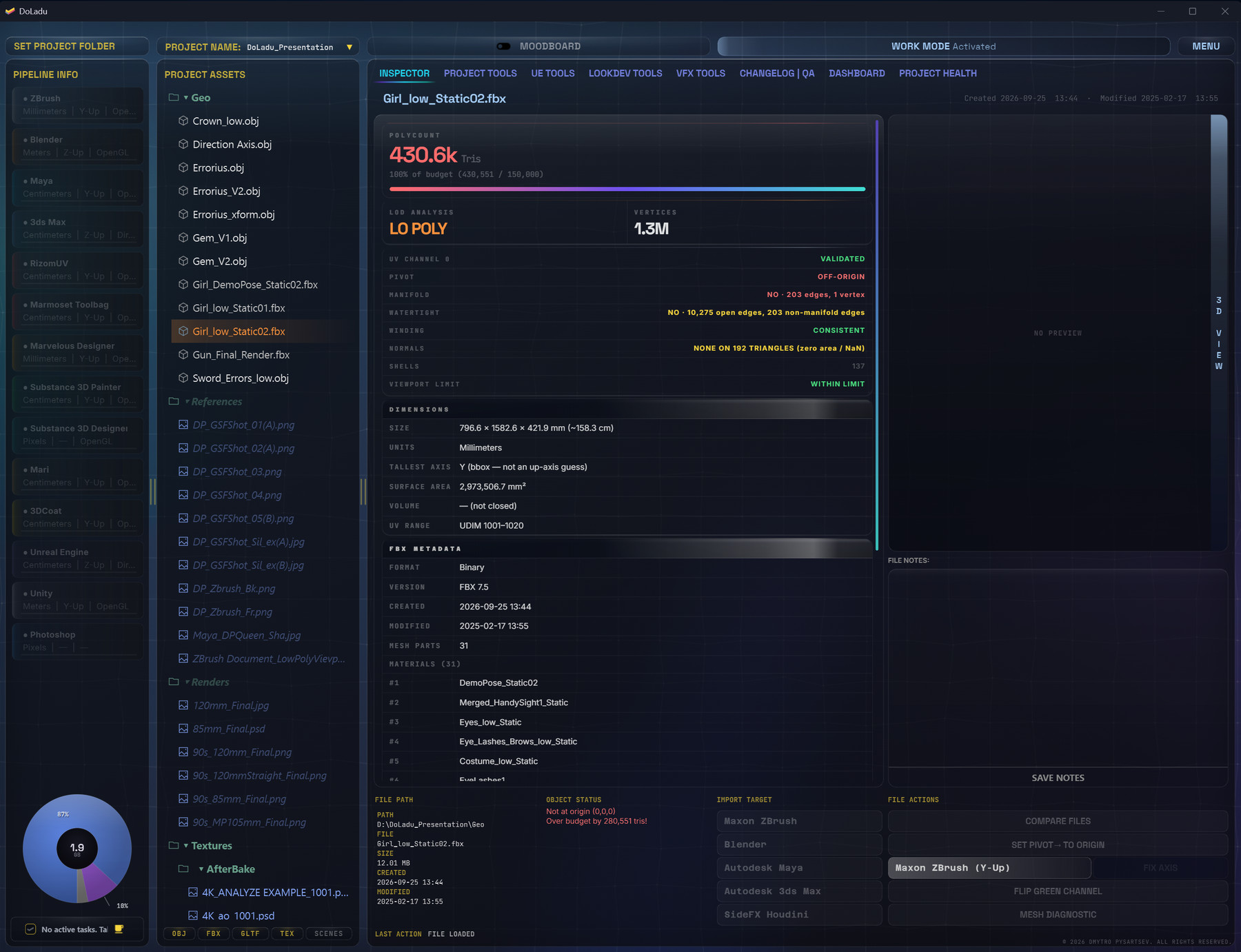
Load a mesh and get wireframe, UV and normal overlays, hard edges and open shells — next to the numbers that decide whether it ships: poly count against your budget, pivot at origin, winding consistency, units and bounds. Textures get the same treatment: size, power-of-two, colour statistics and colour space.

Solves “it looked fine in Maya”.
Project Tools

The batch floor.

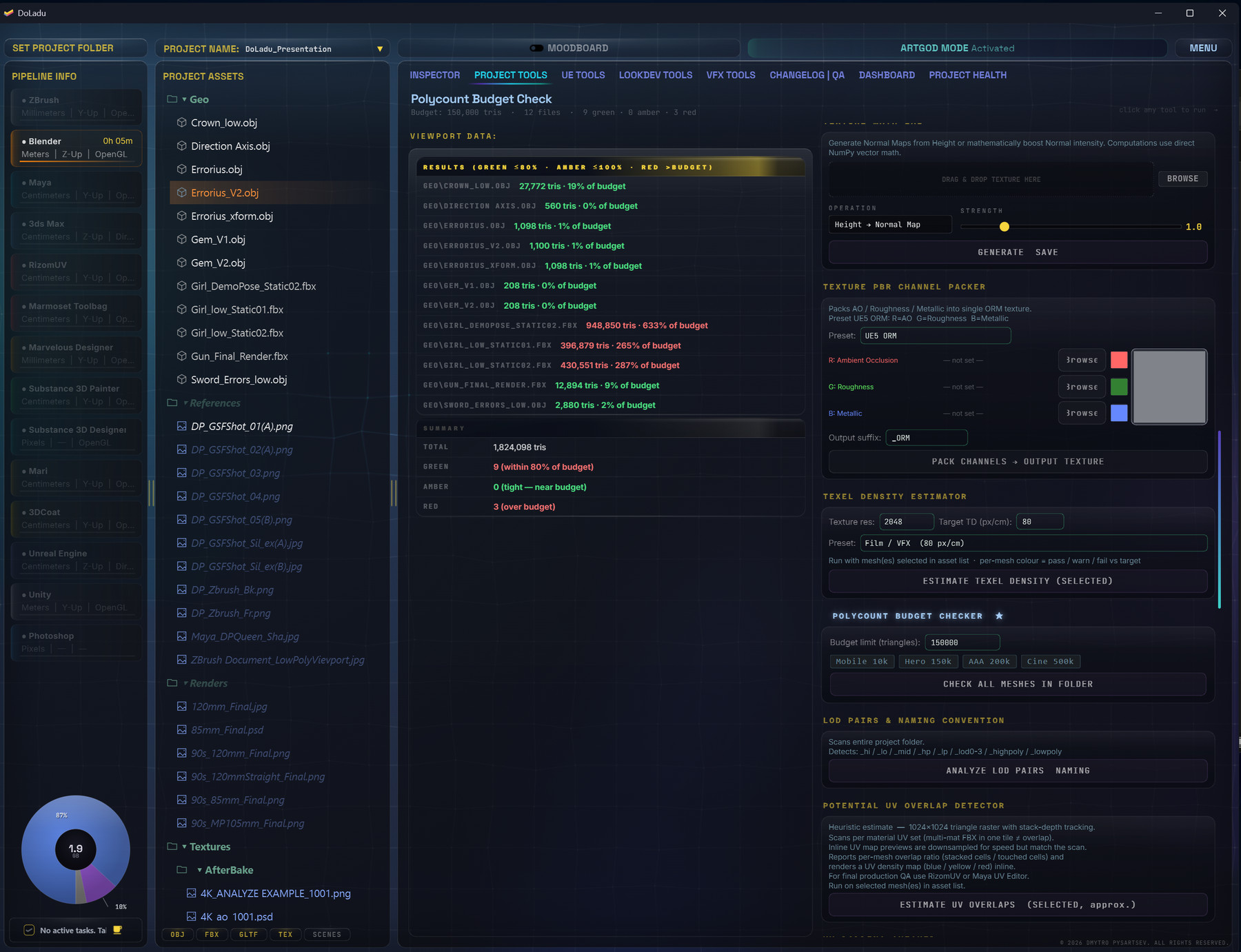
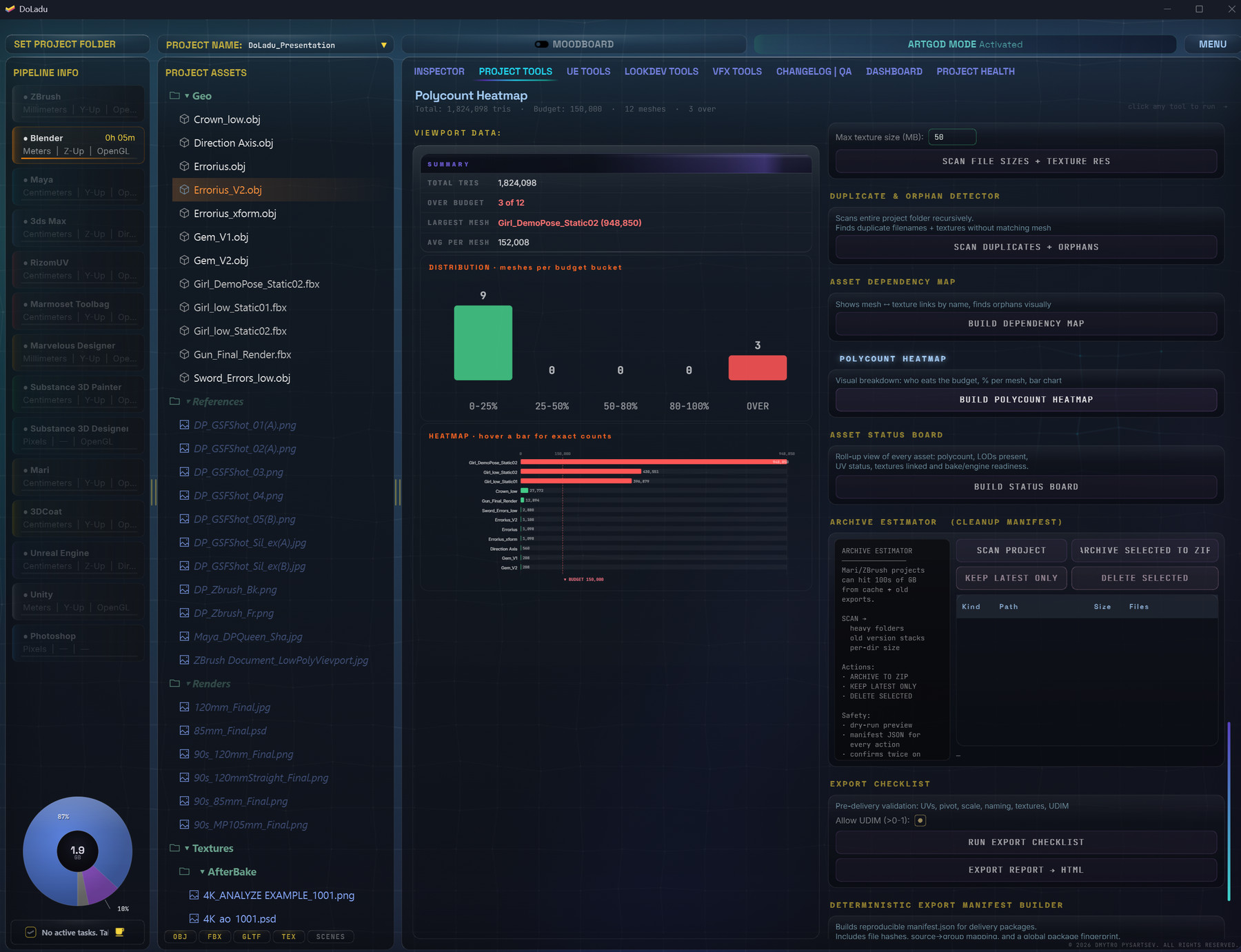
Duplicates, texture sets, renaming, resizing, format conversion, snapshots — run across the whole project at once, with a polycount budget check that shows you every mesh against the limit in one list, and a heatmap of where the budget actually goes.

Solves the hour you spend renaming files by hand.

UE Tools

Checked before
the importer sees it.

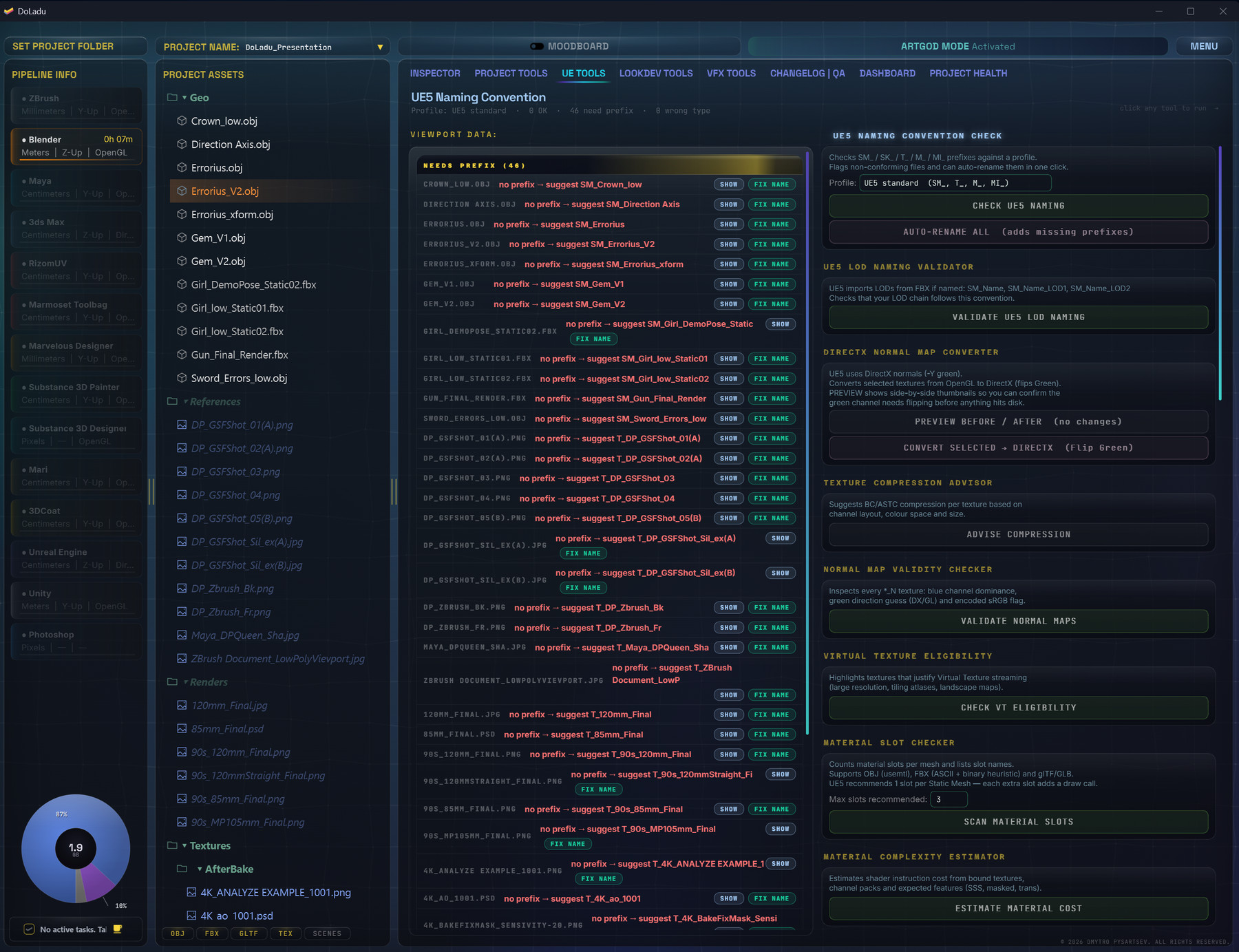
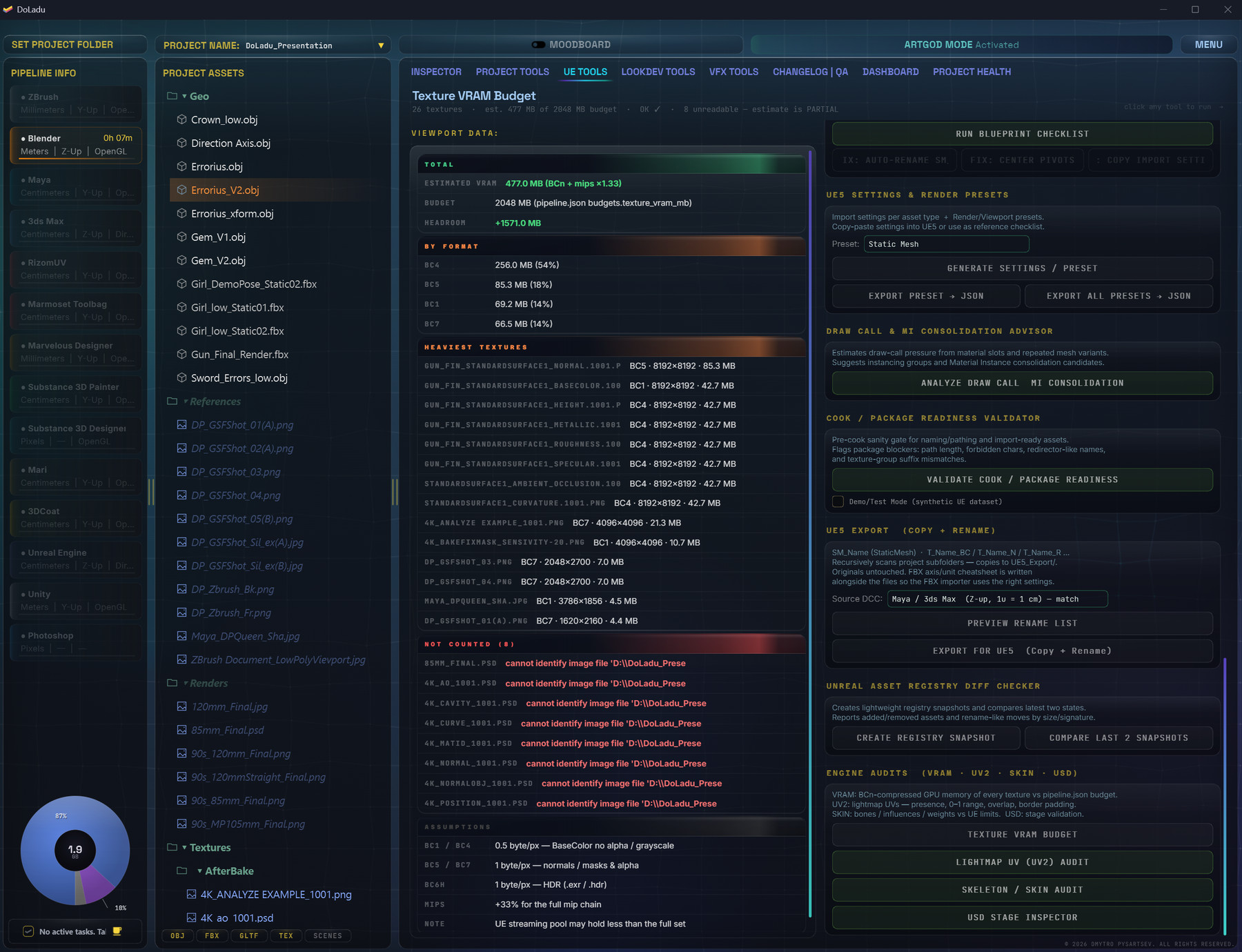
Nanite and Lumen eligibility, lightmap UVs, collision meshes, texture VRAM against a budget, UE naming with one-click auto-rename, and a DirectX/OpenGL normal converter that shows before and after rather than asking you to trust it.

Solves the import that silently does nothing.

LookDev Tools

Stop guessing
light values.

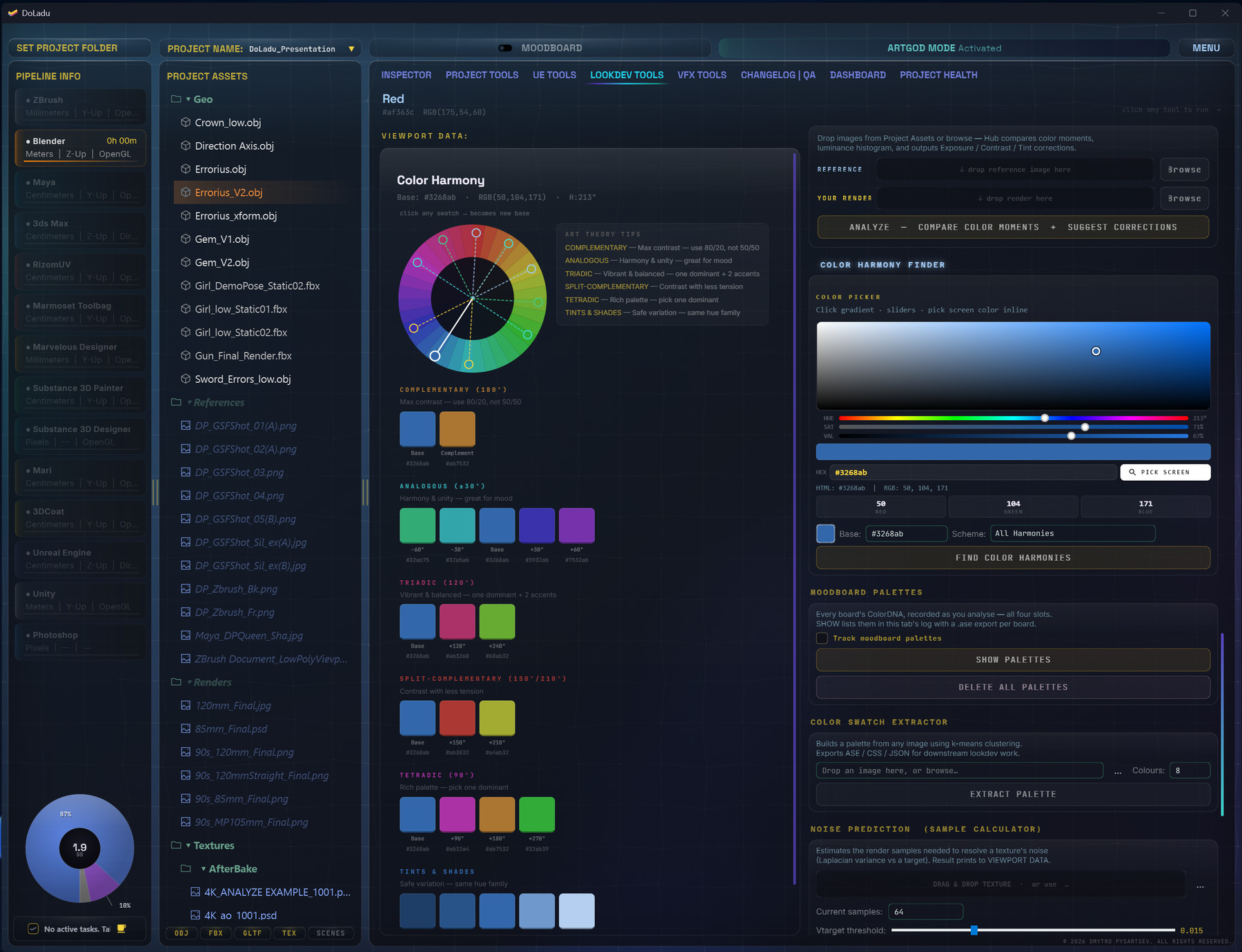
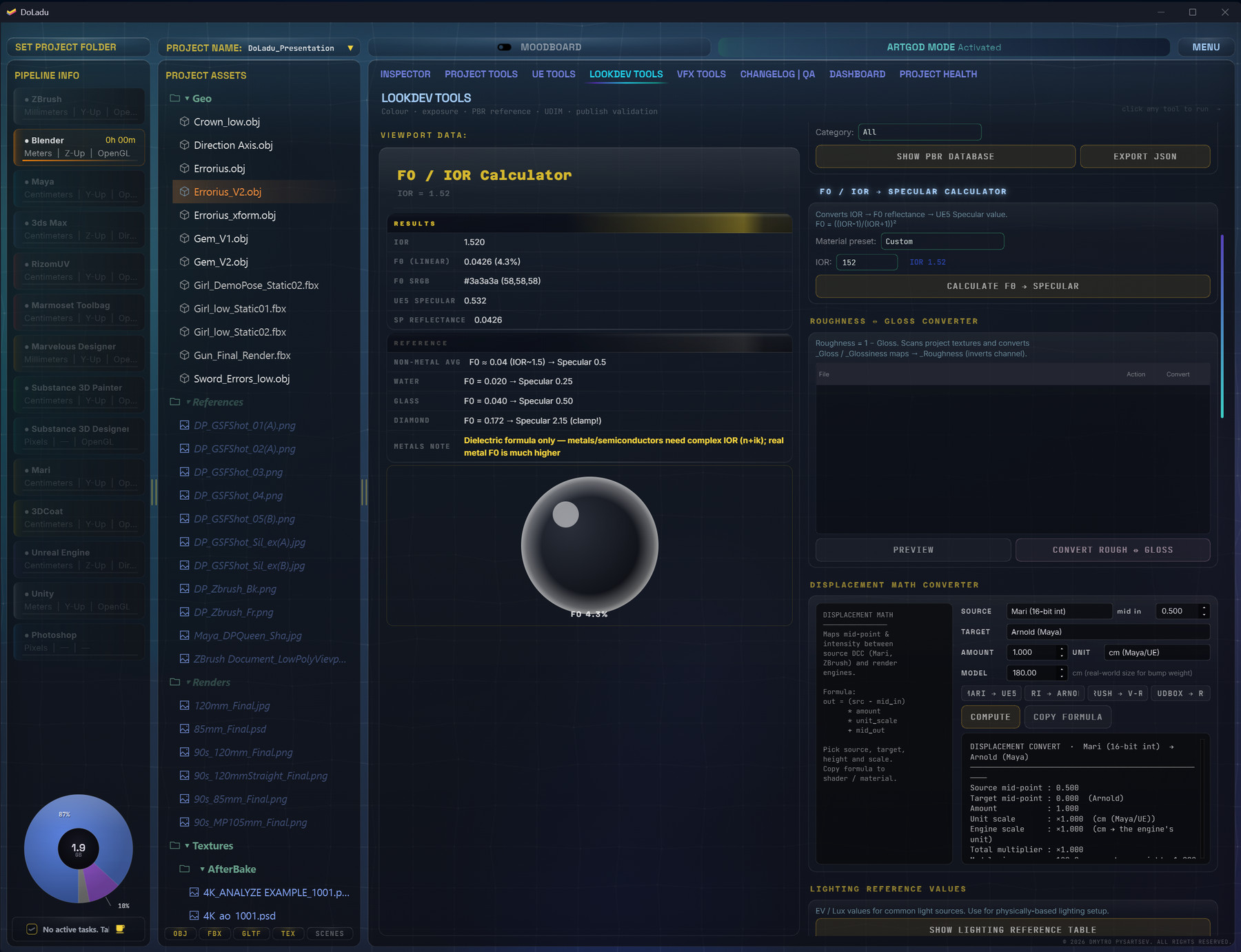
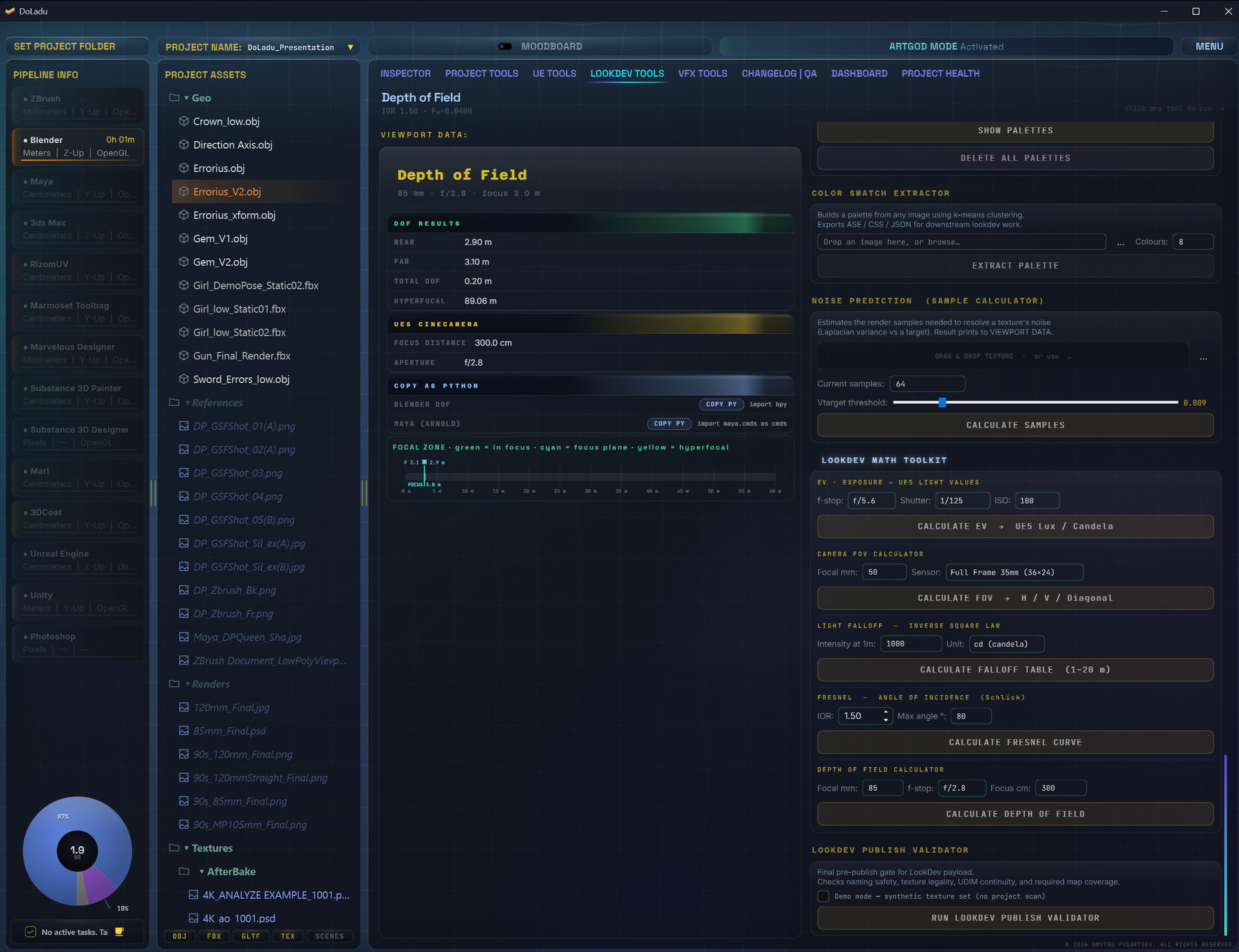
Exposure, FOV, depth of field, Fresnel curves, F0/IOR, albedo range — the numbers you paste into the engine. Plus real EV and Lux figures for clear sky, direct sun, softbox and moonlight, and colour harmonies pulled from your reference.

Solves the afternoon spent matching a plate by eye.

VFX Tools

Frames, caches and passes,
before comp sees them.

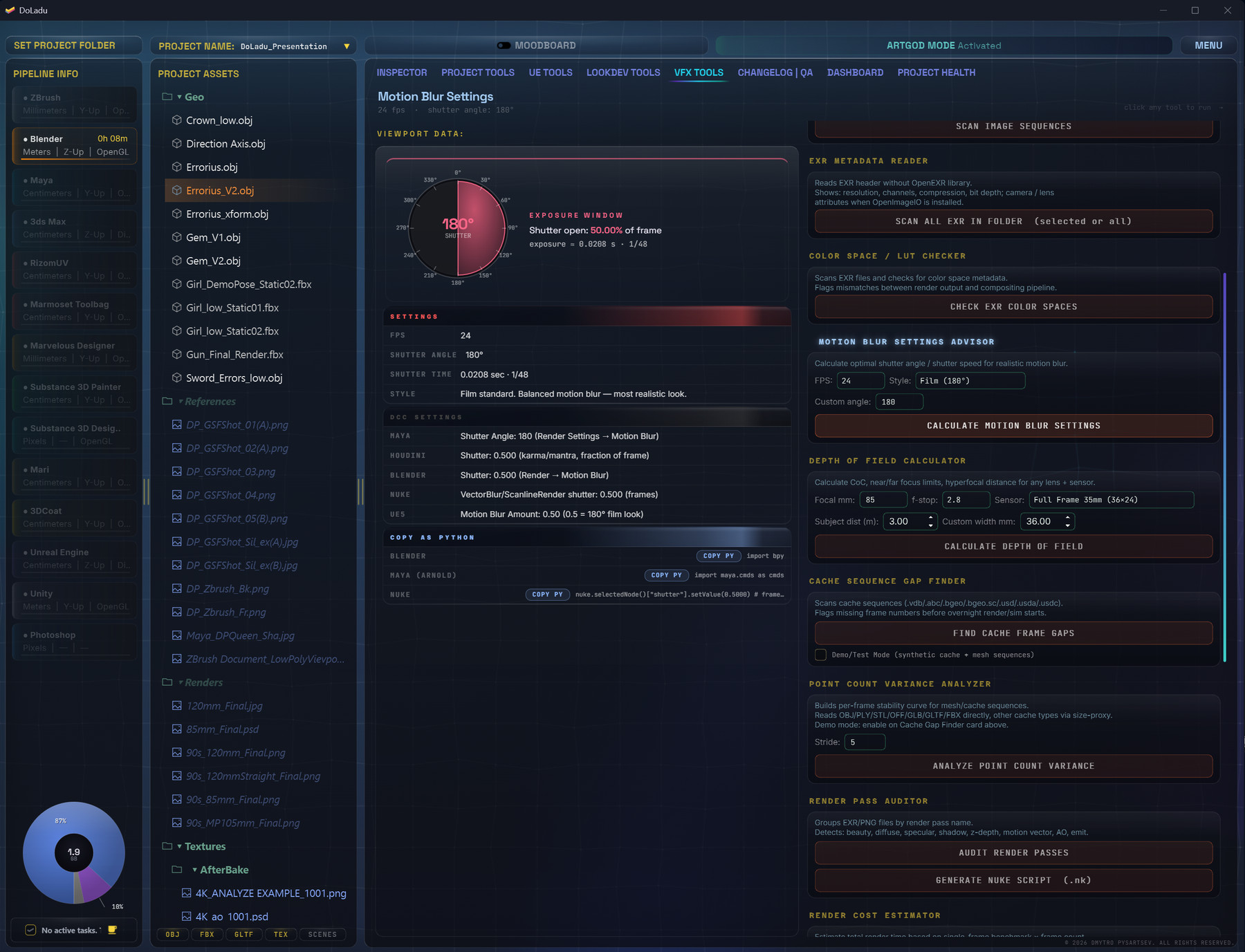
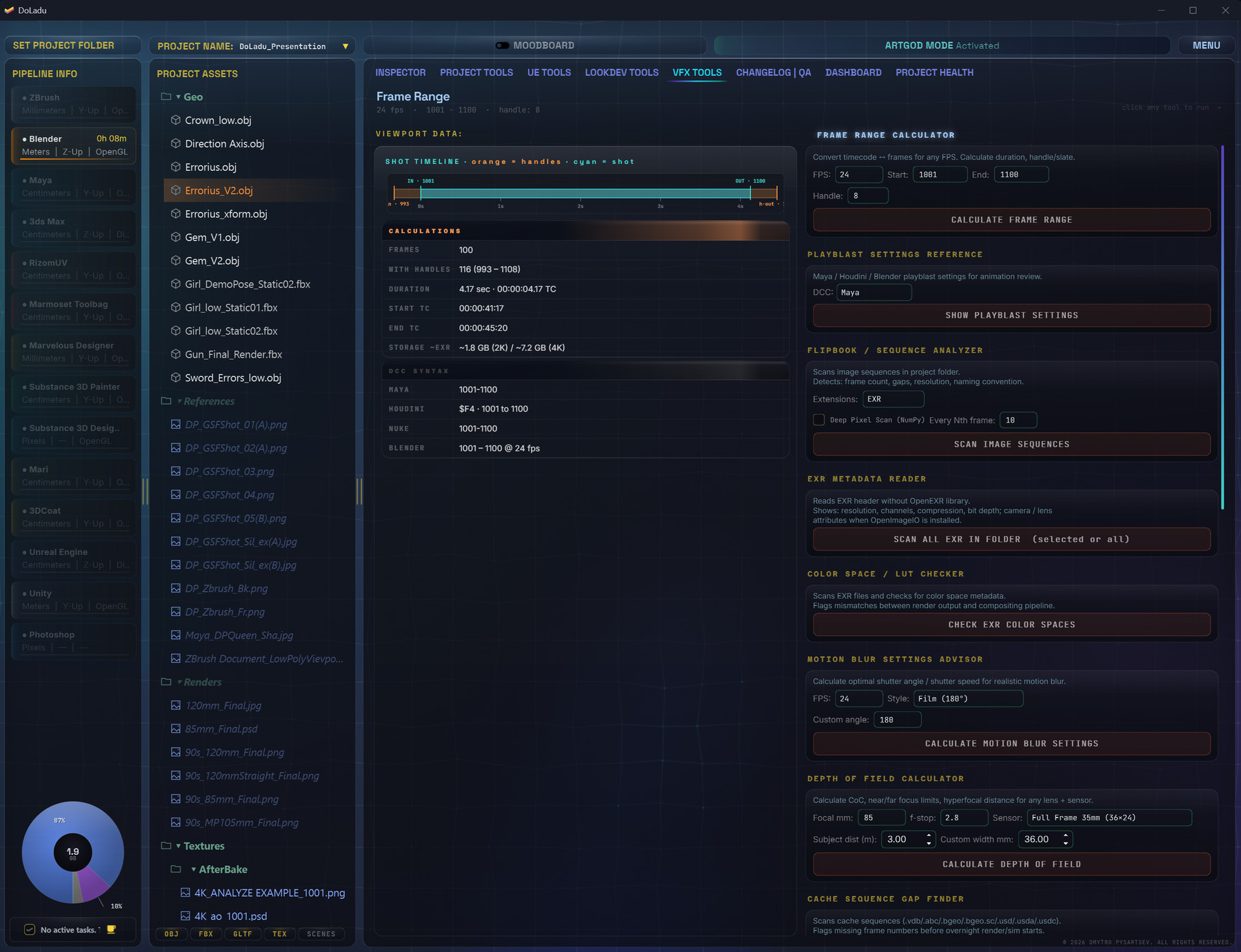
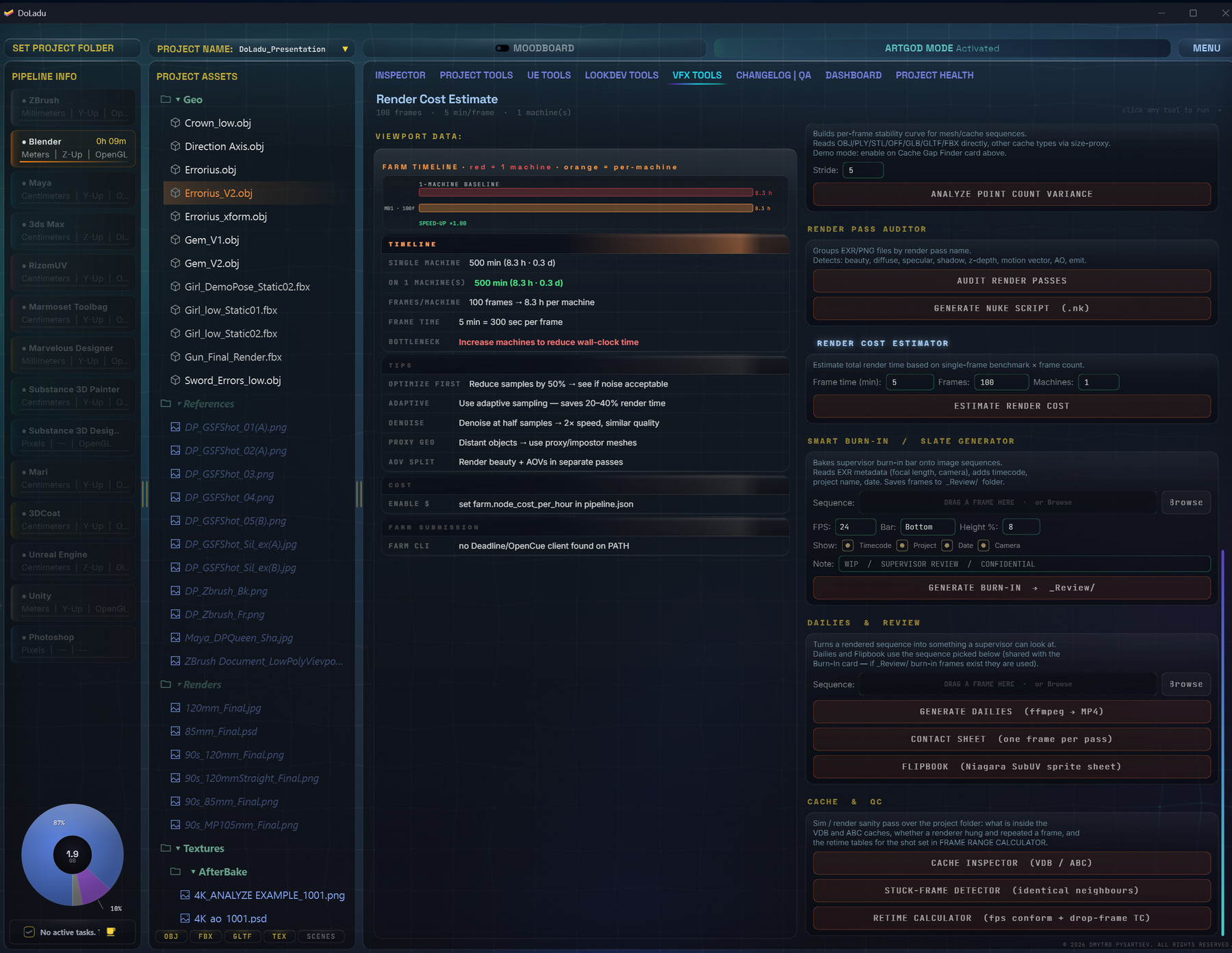
Gaps and stuck frames in image and cache sequences, EXR metadata, render passes audited and handed to Nuke as a script, render cost estimated before the farm, burn-ins and slates for dailies. Shutter angle comes out as the value Maya, Houdini, Blender, Nuke and Unreal each expect.

Solves the missing frame that turns up on Friday.

Changelog | QA

What changed,
and what's still wrong.

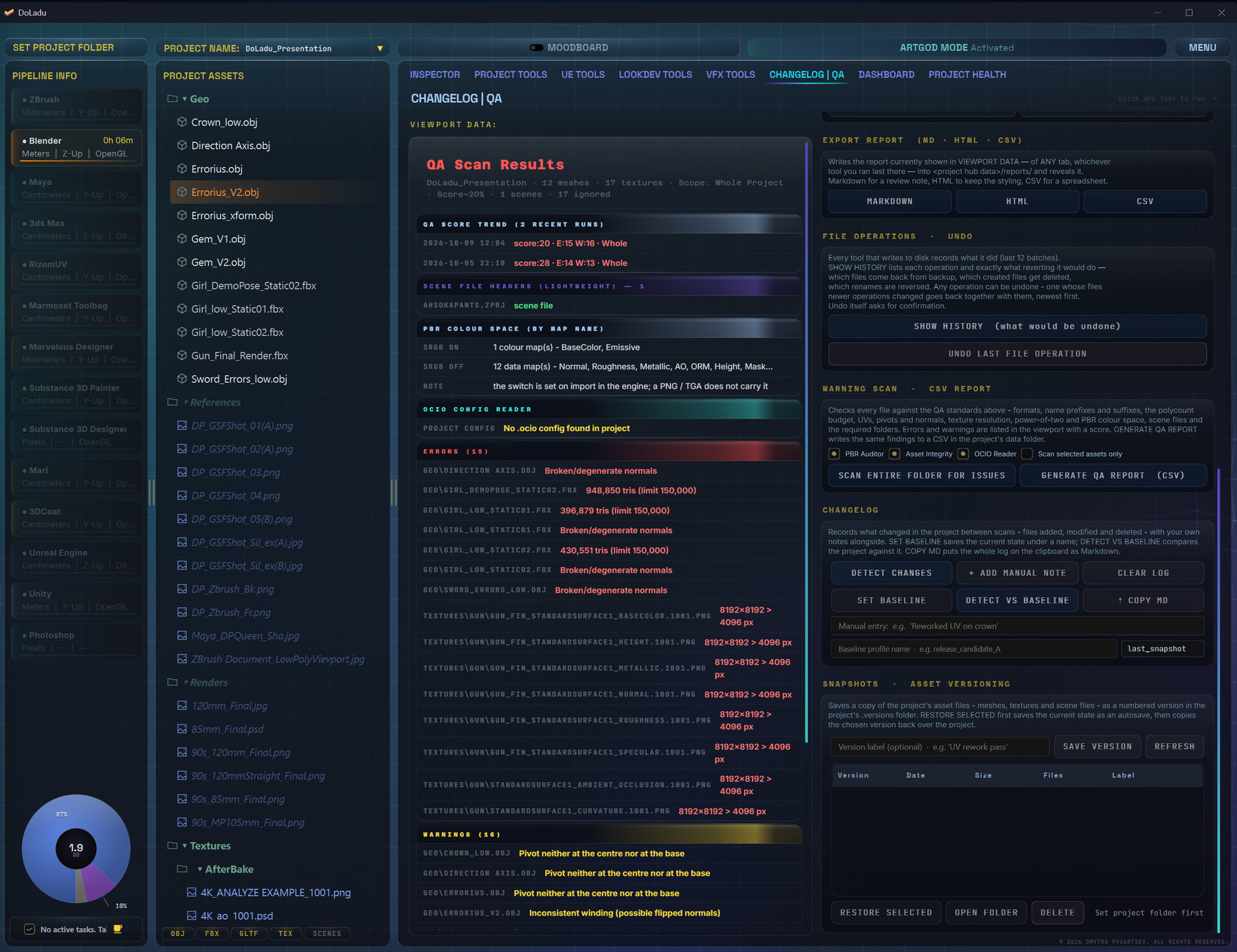
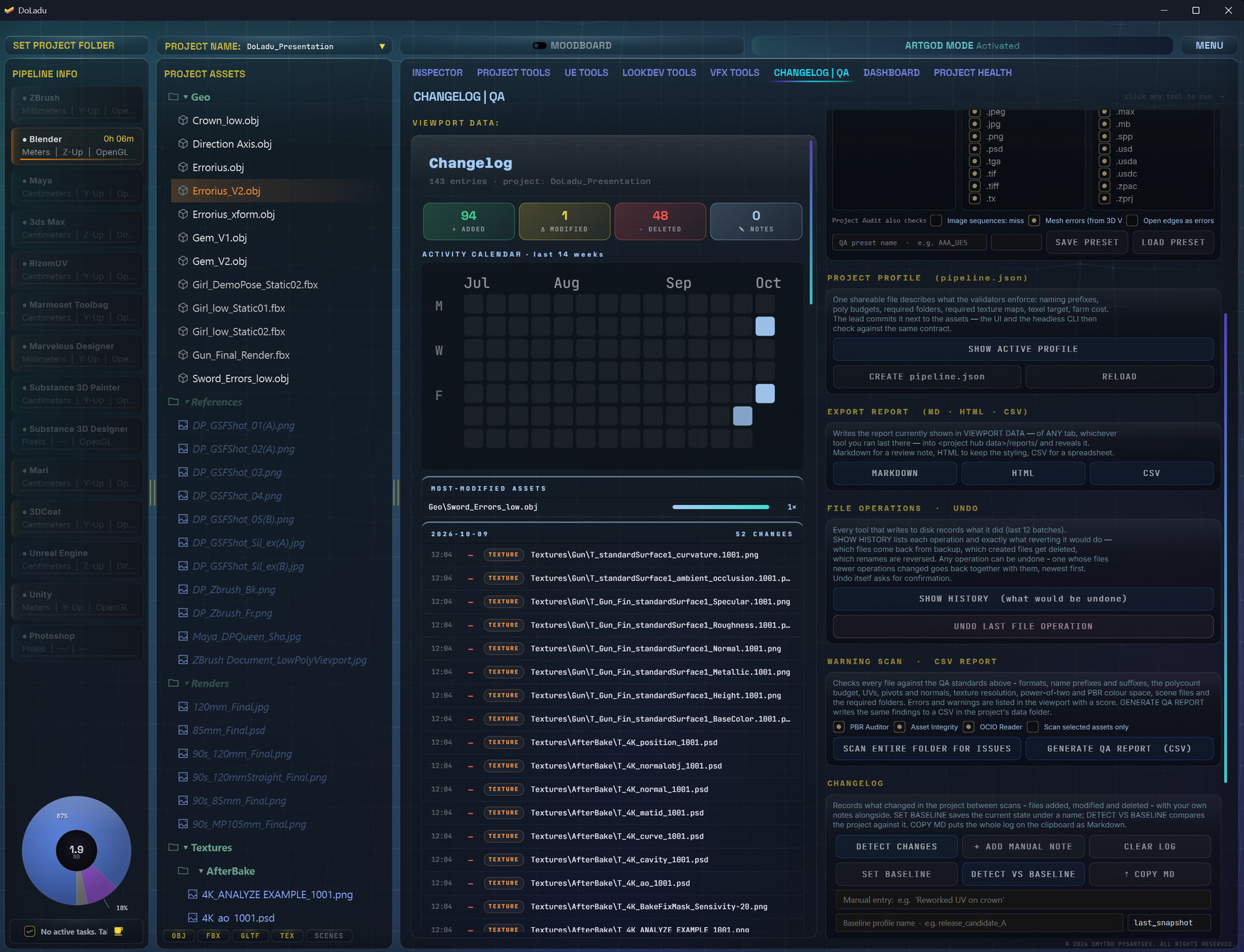
What changed in the project since the baseline you set — files added, modified and deleted — beside the full warning scan, with every error and warning named by file and exported as Markdown, HTML or a CSV you can send. Numbered snapshots keep versions of the asset files, and every file operation can be undone.

Solves the review where nobody knows what changed since Tuesday.

Dashboard

Where the hours
actually went.

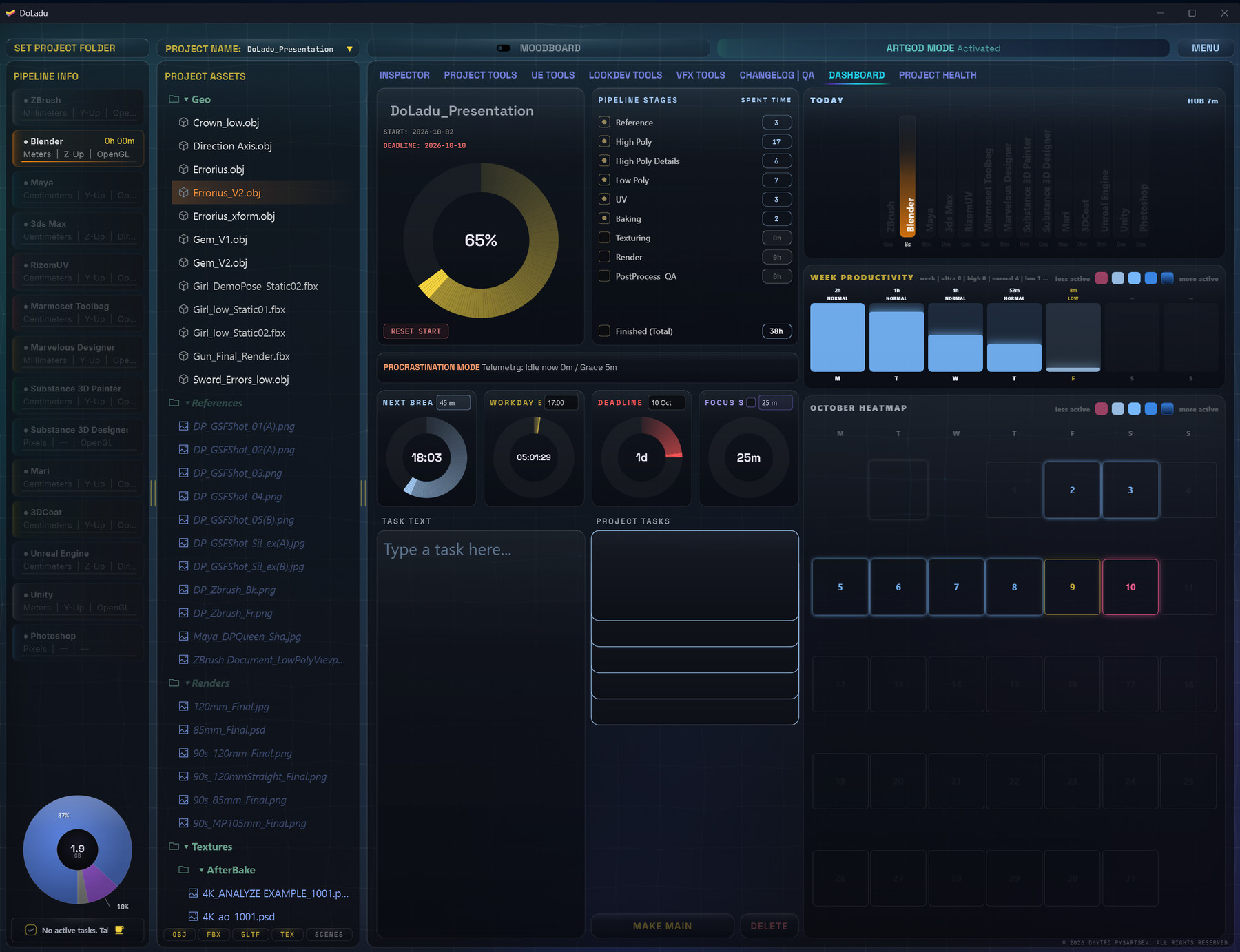
Time on the project by program and by pipeline stage, the deadline counting down, breaks and focus sprints, a week of productivity and a month heatmap — and the task list, kept next to the work it's about.

Solves the timesheet rebuilt from memory on Friday.

Project Health

Getting better,
or just bigger?

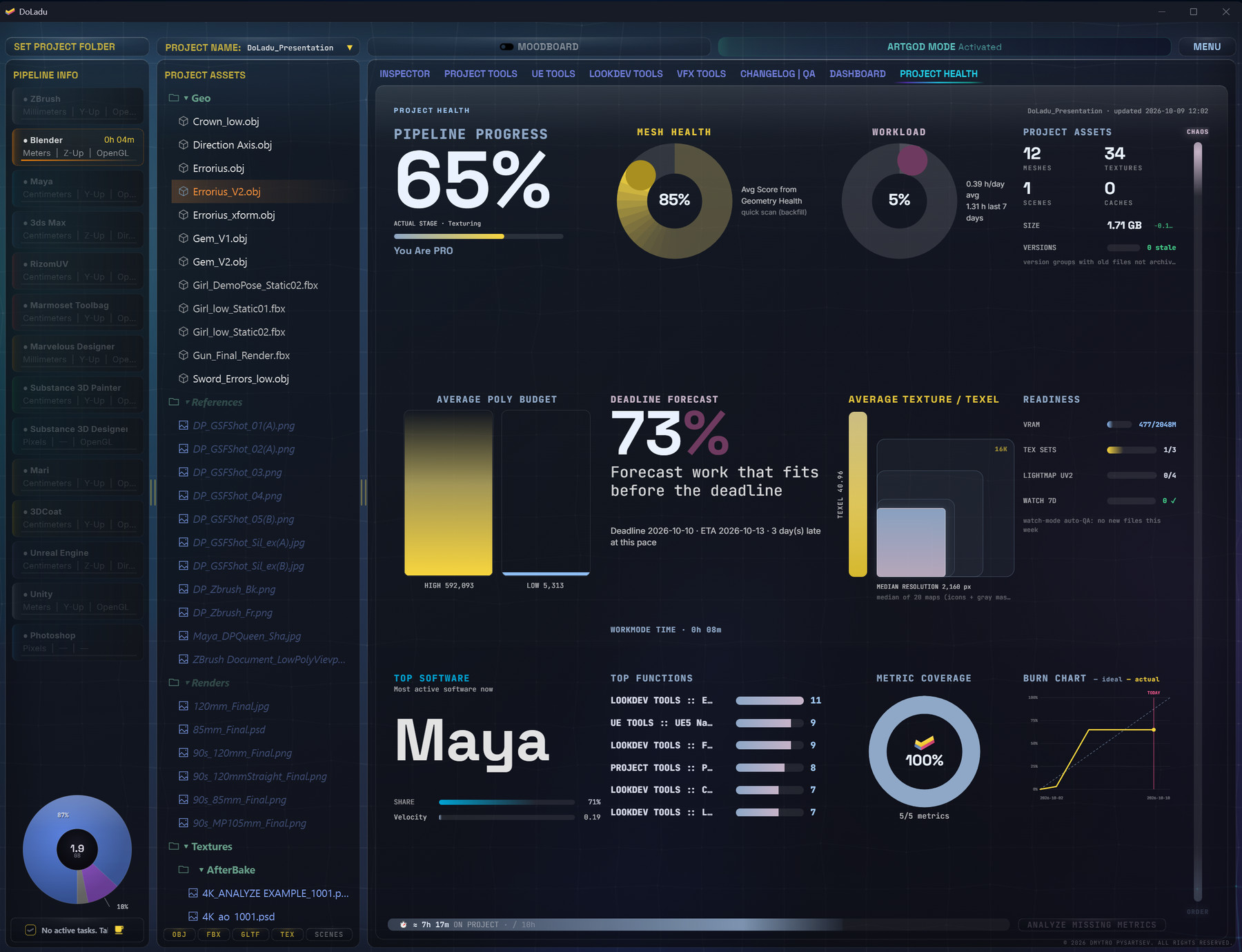
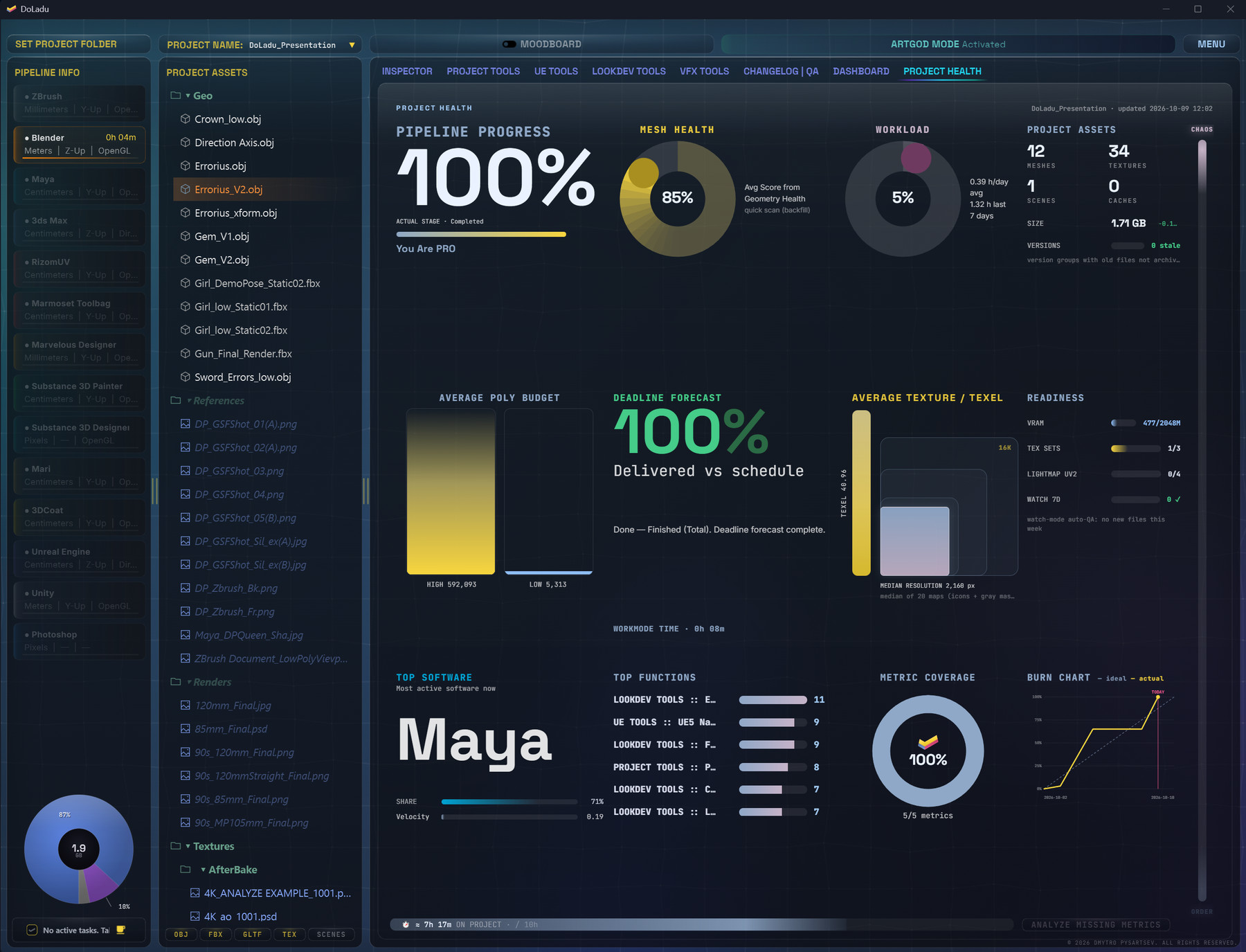
Pipeline progress, mesh health, poly and texel budgets, VRAM readiness and a burn chart against the deadline, with a forecast of whether you'll make it. The score over time, so you can see which way the project is going.

Solves “are we on track?” answered with numbers.

DoLadu Inspector on a mesh: polycount against budget, LOD analysis, pivot, winding, dimensions and FBX metadata
Screenshot slotdoladu/assets/shots/inspector-01.jpg
Inspector — budget, topology and metadata for a mesh, on one screen.
DoLadu Inspector on a texture: resolution, power-of-two check, colour statistics and colour space, with a preview
Screenshot slotdoladu/assets/shots/inspector-02.jpg
Inspector — textures get the same check: size, power-of-two, colour and colour space.
DoLadu Project Tools: polycount budget check listing every mesh against the limit
Screenshot slotdoladu/assets/shots/project-tools-01.jpg
Project Tools — every mesh against the polycount budget, in one list.
DoLadu Project Tools: polycount heatmap and distribution of meshes per budget bucket
Screenshot slotdoladu/assets/shots/project-tools-02.jpg
Project Tools — where the budget goes: distribution and a heatmap per mesh.
DoLadu UE Tools: UE5 naming convention check with a suggested name and fix button for every file
Screenshot slotdoladu/assets/shots/ue-01.jpg
UE Tools — UE naming checked, with a suggested name and a fix beside every file.
DoLadu UE Tools: texture VRAM budget by compression format and the heaviest textures
Screenshot slotdoladu/assets/shots/ue-02.jpg
UE Tools — texture VRAM against the budget, by format and by heaviest map.
DoLadu LookDev Tools: colour harmony wheel, colour picker and palettes extracted from reference
Screenshot slotdoladu/assets/shots/lookdev-01.jpg
LookDev — colour harmony and palettes from your reference.
DoLadu LookDev Tools: F0 and IOR calculator with reference values for common materials
Screenshot slotdoladu/assets/shots/lookdev-02.jpg
LookDev — F0 and IOR to specular, with reference values for common materials.
DoLadu LookDev Tools: depth of field result and the EV, FOV, light falloff and Fresnel calculators
Screenshot slotdoladu/assets/shots/lookdev-03.jpg
LookDev — depth of field, exposure, falloff and Fresnel, worked out.
DoLadu VFX Tools: motion blur settings with the shutter value each program expects
Screenshot slotdoladu/assets/shots/vfx-01.jpg
VFX Tools — shutter angle, with the value each program expects.
DoLadu VFX Tools: frame range calculator with handles, timecode and playblast settings
Screenshot slotdoladu/assets/shots/vfx-02.jpg
VFX Tools — frame range, handles and timecode, with sequence checks beside it.
DoLadu VFX Tools: render cost estimate with a farm timeline and burn-in generator
Screenshot slotdoladu/assets/shots/vfx-03.jpg
VFX Tools — render cost estimated before the job goes to the farm.
DoLadu QA scan results: errors and warnings, each with its file and the limit it broke
Screenshot slotdoladu/assets/shots/changelog-01.jpg
Changelog | QA — every error and warning with its file; the report exports to CSV.
DoLadu Changelog: files added, modified and deleted since the baseline, with an activity calendar
Screenshot slotdoladu/assets/shots/changelog-02.jpg
Changelog | QA — what changed in the project since the baseline.
DoLadu Dashboard: pipeline stages, deadline countdown, weekly productivity and task list
Screenshot slotdoladu/assets/shots/dashboard.jpg
Dashboard — time, deadline and tasks for the project.
DoLadu Project Health mid-project: pipeline progress, mesh health, deadline forecast
Screenshot slotdoladu/assets/shots/project-health-01.jpg
Project Health — mid-project, with a forecast for the deadline.
DoLadu Project Health at the end: pipeline 100%, delivered against schedule
Screenshot slotdoladu/assets/shots/project-health-02.jpg
Project Health — the same screen at delivery.

What one scan covers

Ten checks,
one pass over the folder.

Files checked against a naming profile — prefixes, texture suffixes, packed maps — with auto-rename for everything that doesn't conform. Duplicate assets and oversized files surfaced in the same pass, so you find the copy of a copy before it ships with the rest.
Winding consistency, so flipped faces are named rather than discovered in engine. Green channel direction for DirectX against OpenGL, with a before/after preview. Colour space per map — a normal map sitting in sRGB is caught here, not in a lighting review.
UV channel validation with the UDIM grid, overlap detection, and a texel density heatmap across the mesh measured against your target rather than against a guess. Lightmap UVs checked separately, because the engine treats them separately.
Pivot position against origin, units and bounding box in centimetres, up-axis read from the geometry rather than assumed, and collision meshes checked for the naming and shape the engine expects. A units and axis reference for twelve programs sits beside it, because that mismatch is where most broken exports begin.
Texture sizes against what the asset actually needs, power-of-two compliance, clipped blacks and whites, and total VRAM for the set measured against a budget you set. Full-depth EXR and 16-bit textures go through OpenImageIO, so a 16-bit normal map stays 16-bit.

Moodboard

Reference boards
that do something.

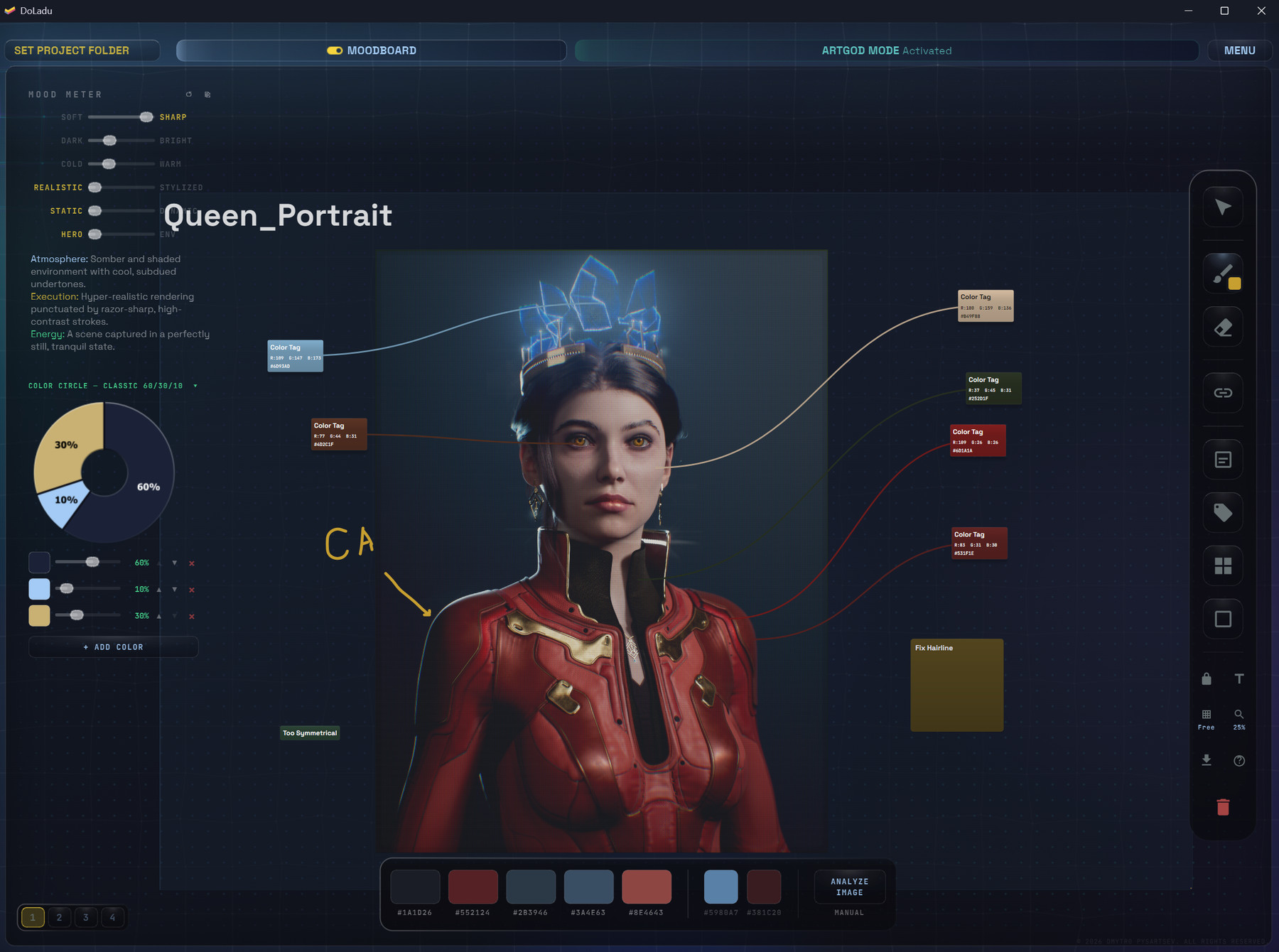
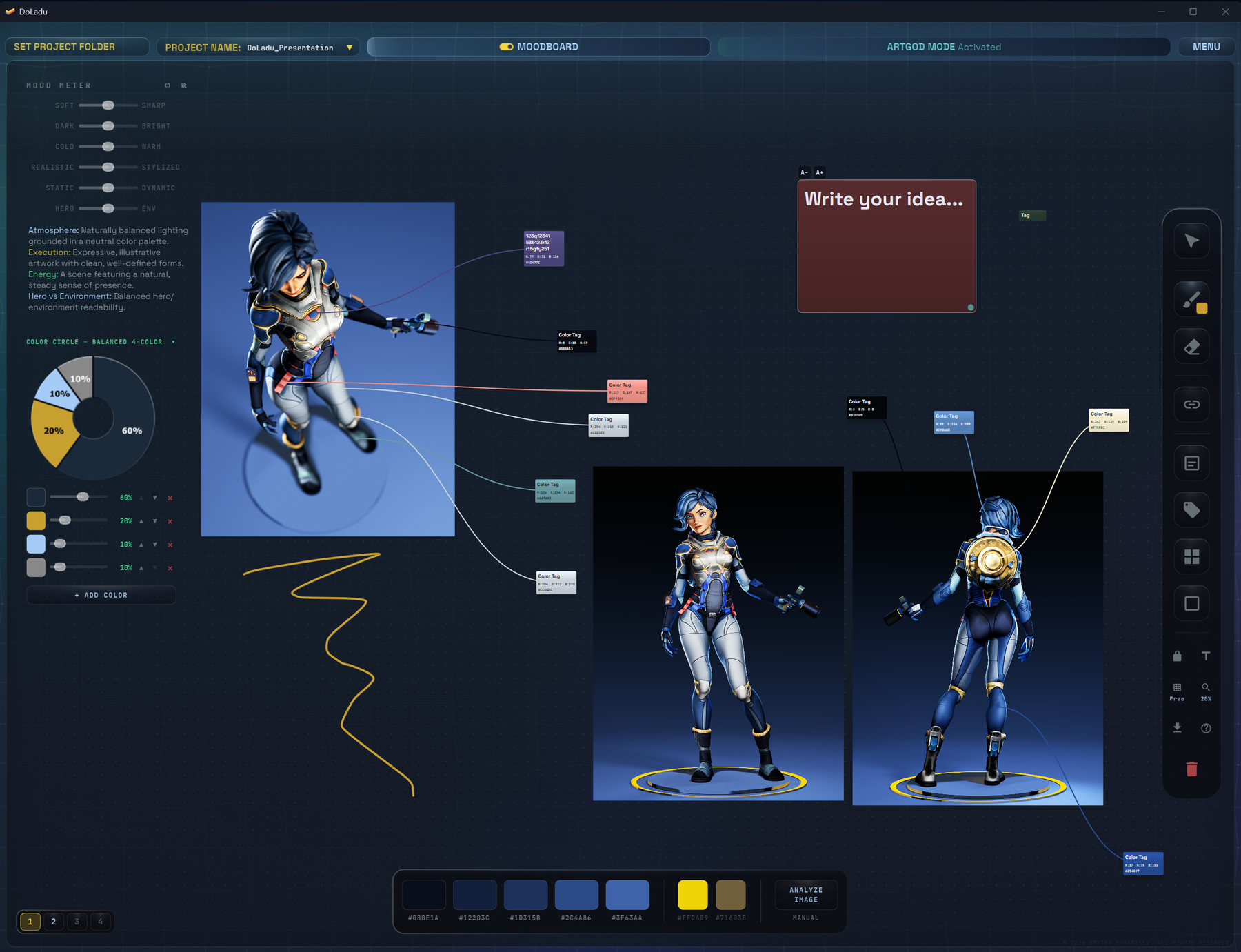
Four boards per project. Drop images, notes, colour tags and strokes on an infinite canvas.

Every board extracts its own palette and exports .ase — the swatches open straight in Photoshop and Substance. The colour tags carry the hex, and you can select the code and copy it.

It's the reference wall you already keep, except it lives with the project and feeds the rest of the app.

DoLadu Moodboard: a character portrait with colour tags linked to regions, mood sliders and the extracted palette
Screenshot slotdoladu/assets/shots/moodboard-01.jpg
Moodboard — colour tags carry the hex; the palette underneath exports as .ase.
DoLadu Moodboard: reference renders of one character with colour tags, a colour circle, a sketch stroke and a note on an infinite canvas
Screenshot slotdoladu/assets/shots/moodboard-02.jpg
Moodboard — references, notes, strokes and colour tags on one canvas, four boards per project.

Separately, Atlas is the manual that ships inside the app — what every tool does and when to reach for it, without leaving the window.

Privacy

Nothing leaves
your machine.

No account. No cloud. No telemetry. It works with the network cable out.

The only time DoLadu talks to the internet is to check your licence — and if the server is unreachable, it keeps working for seven days while it retries. An outage on our side is not your problem.

Your project never uploads anywhere, because there is nowhere for it to go.

Formats

Reads what
you already have.

MeshesFBX · OBJ · GLB/glTF · USD · Alembic · PLY · STL
TexturesPNG · TGA · TIFF · PSD · EXR · HDR
CachesVDB · Alembic

Full-depth EXR and 16-bit textures go through OpenImageIO, so a 16-bit normal map stays 16-bit.

Pricing

The year costs
six months.

Monthly

€29.99/ month

For one project. Cancel any time.

Best value

Yearly

€179.99/ year

The year costs six months — save €179.89.

Indie

€599.99/ year

5 seats — €120 per artist, per year.

Sold through Lemon Squeezy, which handles VAT and invoicing as merchant of record.

Before you ask

The six questions I get most.

Only to check your licence. If the server is down, DoLadu keeps working for seven days while it retries.
Not unless you tell it to. Safe mode writes to copies. Everything destructive is journalled and reversible with one command.
It stays 16-bit. Depth-sensitive operations go through OpenImageIO.
It reads files, not scenes — so it doesn't care whether they came from Blender, Maya, 3ds Max, Marvelous or Substance.
Windows only for now.
Yes. Sign out on the old machine, activate on the new one.

Minimum system requirements

What it needs
to run.

Operating systemWindows 10 64-bit, version 1809 or newer
Processor4-core x64 — Intel Core i5/i7 6th gen or AMD equivalent
Memory8 GB RAM
GraphicsAny GPU with OpenGL 3.3 / WebGL 2 support and current drivers
Storage1.5 GB free — about 950 MB for the program, the rest for project data
Display1280 × 800

Intel HD 520 and up will run, but the 3D viewer will feel slow on large meshes.

Get it

Find it now,
not the night before.

  • Runs on your machine — no account, no cloud, no telemetry.
  • Your work stays on your machine — you pay for the software, not for a server holding your files.
  • Sold through Lemon Squeezy, which handles VAT and invoicing as merchant of record.